
When a counterparty wants the KYB record as files rather than a link, export a document pack: the entity's documents bundled as a ZIP or merged into a single PDF, with an optional cover page summarizing the KYB record's state.
Before you start
- Any role that can view the entity's documents can export, including View Only.
- For a live, always-current view, a permissioned share link is usually better than a file export; use the pack when the recipient insists on files.
Run the export
- Open the entity's KYB record and choose Export pack from the KYB Manager actions.
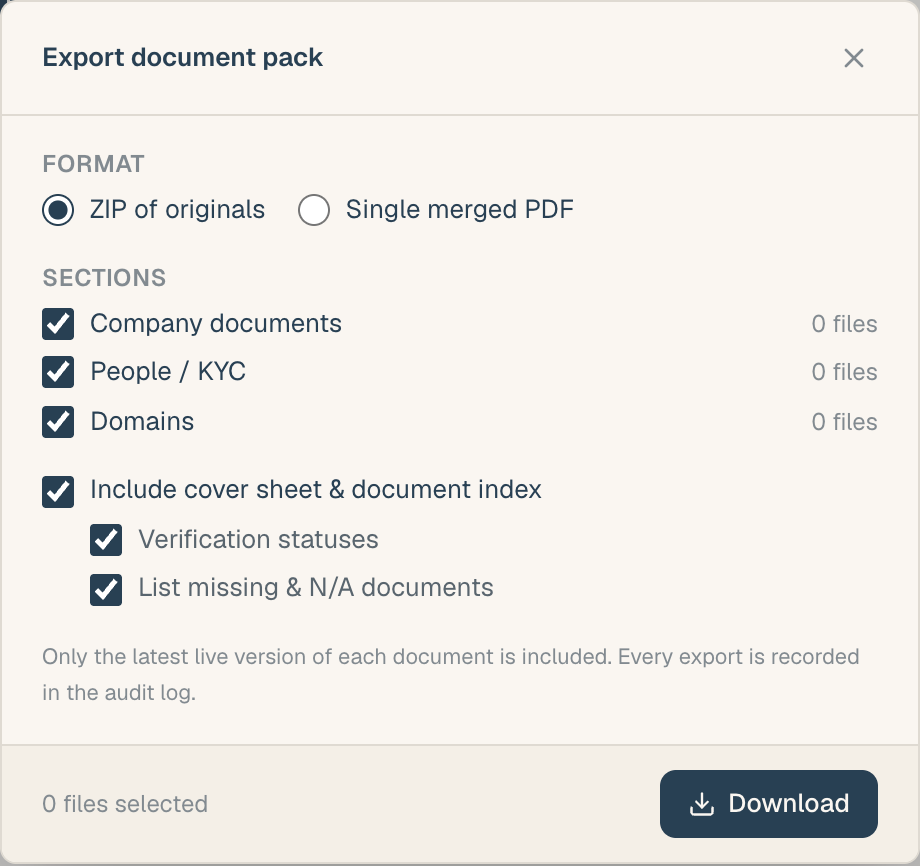
- Pick the sections to include: which parts of the document checklist go into the pack.
- Choose the format:
- ZIP: every included document as its own file, with an index.
- Single merged PDF: the documents combined into one file, images rendered as full pages.
- Configure the cover page (optional): turn it on or off, and choose whether it lists document statuses and whether missing and N/A items are shown.
- Export and download.
What's included
- Company documents from the selected sections, where a current file exists.
- Documents attached to parties in the ownership register (for example, contracts held against a corporate owner).
What's excluded or handled specially
- Word and TIFF files can't be merged into a PDF. In the merged-PDF format they are listed honestly (in the index, or on a trailing note page) rather than silently dropped; in the ZIP format they're included as-is.
- Erased people are excluded entirely: a person removed for privacy reasons leaves no trace in the pack.
- Slots with no uploaded file contribute nothing beyond their line on the cover page (if you enabled the missing/N-A listing).
Limits
- The pack is capped at 200 MB. If a KYB record exceeds it, export fewer sections per pack, or use the ZIP format and split the export.
Tips
- Cover page as a status report: with statuses and missing items enabled, the cover doubles as a gap summary you can send to a counterparty asking "what's outstanding".
- Exports are recorded in the audit trail, so there's a record of what left the workspace and when.
Related articles
- Share your KYB package: the live-link alternative to a file export
- Document statuses: what the cover page statuses mean
- A tour of the KYB Manager: where the export action lives