
A bank or PSP has sent you an onboarding questionnaire and a document list. This guide walks the whole response through ComplyWise: check what you have, close the gaps, and hand over a package that stays current.
1. Check your readiness
Open KYB Manager, select your company, and look at the KYB readiness indicator. It tells you at a glance how much of the KYB record is complete and verified. The same summary appears on your dashboard's company card.
Two things to fix before anything else:
- Expired documents. Renew anything showing Expired first: banks reject stale evidence, and a renewal is just an upload into the same slot. ComplyWise warns you 30 days and 7 days before documents lapse, so ideally nothing is expired when the request lands.
- Needs attention. Open any flagged slot and resolve the reviewer's or AI check's note.
2. Fill the gaps
Compare the bank's list against your KYB record:
- Upload anything you hold that's missing. See Upload documents into your KYB record.
- If a document has to come from someone else, a vendor, a corporate shareholder, a director, send them a collection link instead of chasing attachments. See Request documents from a counterparty.
- Mark genuinely inapplicable items N/A so your readiness score reflects reality.
3. Review the fact sheet
Open the KYB Manager's Fact Sheet tab. It holds the structured answers onboarding questionnaires ask for, organised by the usual due diligence sections, with derived facts pulled live from the KYB record and curated facts you maintain by hand. Check that key values are filled and current, then export it as a PDF if the bank wants a written summary alongside the documents.
4. Hand over the documents
You have two options, and the first is usually better:
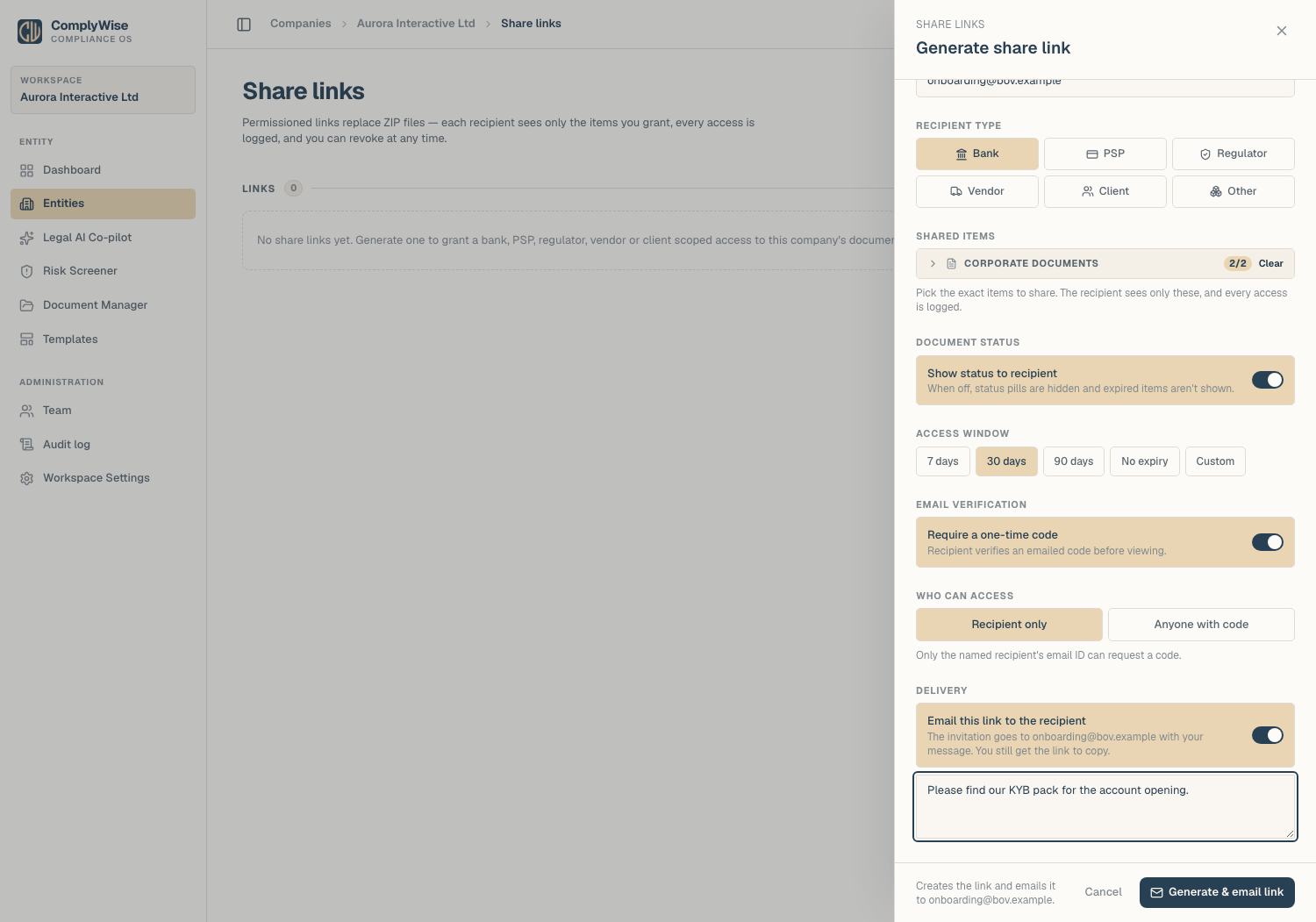
Send a share link (recommended). Generate a permissioned, read-only link scoped to what the bank asked for, and let ComplyWise email it to their onboarding address with a short message. Require a one-time code if the pack is sensitive: the reader confirms their address and enters a code sent to it before anything opens. They see a branded, always-current view: when you upload a renewal next quarter, their link shows it automatically, with nothing to re-send. See Share your KYB package.
Export a document pack. If the bank insists on files, use Export pack on the Business Docs tab. Pick the sections to include and choose the format: a ZIP of the individual files with an index, or a single merged PDF with an optional cover page showing statuses. The export is logged.
5. Track and follow up
- The access log shows when the invitation was emailed, when the bank verified, and which documents they opened or downloaded, so you know exactly what they have looked at before you follow up.
- If the relationship ends or the review closes, revoke the link.
- Keep the KYB record alive: expiry alerts and the daily digest will nudge the right people as documents age, so the next onboarding request starts from green.
Related articles
- Share your KYB package: create the permissioned link
- Request documents from a counterparty: collect what you're missing
- Upload documents into your KYB record: how uploads and verification work
- External links: share, collect, and sign: the safeguards behind every link